
Kiva Logic Blog
Updates, tips, and news from our team

Run promotions straight from a page URL
You can now run a promotion straight off a page URL. Point a QR code, a flyer, an ad, or an email link at one of your page builder pages, and the discount is already applied by the time someone signs up. They don't type a code, they don't hunt for a box to check. They land, they sign up, the deal is on.
The trick is a code in the link. Add ?code=YOURCODE to the end of any page builder page URL and that code rides along and auto applies at signup. Because the code lives in the link, one page can run a bunch of promotions at once. Give each source its own code and your reports tell you exactly who sent the signups:
Same page, different links.
To make it land for the customer, there's a new block called Promo Code Unlocked. Drop it anywhere on a page and it shows a banner with the real offer, "20% OFF" or "$10 OFF" or whatever the promo is named, plus a note that it's applied automatically with no code to enter. Best part, it only appears when the visitor actually has a code. No code, no banner, so it's safe to leave on any page and it just lights up for people who followed a promo link.

Build your content pages with Claude Code (early access)
Your content pages, home page, How It Works, landing pages, all of it, can now be built and edited just by chatting with an AI. Connect Claude Code to your store's Page Builder and tell it what you want in plain English: "update my How It Works page," "build a landing page for the fall promo," "write me an About Us page about our local farms." It makes the changes right in your page builder. No HTML, no design tools, no waiting on anyone.
You ask, it does the work, then hands you a draft to review. It's upfront about what's real and what's a placeholder, and it won't publish or change anything on your live site until you say so.
Auto-apply discount codes on your landing pages
Your Page Builder pages can now carry a discount code that gets applied automatically when someone signs up from that page. No typing, no fumbled codes, no "the code isn't working" comments under your ads.
The problem it solves: you run an ad with a promo code and a chunk of people never type it in correctly, or at all. You lose the signup even though the code was fine. Now the code is already waiting when they land. Point the ad at a landing page and everyone who arrives has it saved.
To set it up, open any page in the Page Builder, click the settings gear, and drop a code into the new Auto-apply discount code field. Every visitor who lands on that page has the code saved to their browser for 16 days, and it's already applied when they sign up.
Each page holds its own code, so you can run a separate landing page for every ad or campaign and keep them straight. If a customer types their own code instead, theirs wins.

AI Assistants Can Now Read and Recommend Your Store
More and more people are shopping through AI now. They ask ChatGPT, Claude, Gemini and Perplexity what to buy and where to get it, and those assistants go read your website to answer. Your store just got a set of tools that let them read it correctly and recommend you, instead of guessing at your delivery area and making things up.
Four things are now published automatically on every store:
You can see and test every one of these in one place. Go to Settings → Business Info → AI Business Info, and look for the new AI Surfaces & Tools panel. Open any surface, or hit Test to see exactly what an AI sees. The delivery checker even fills in real in-area and out-of-area ZIPs from your own coverage so you can try it without looking codes up.

Your store is now AI-readable
Every store on Kiva Logic now publishes an llms.txt file. When someone asks ChatGPT, Claude, or Gemini "where can I get produce delivered near me," this is the file those assistants read to figure out what your business is and who it's for. Yours is live right now at yourstore.com/llms.txt.
It builds itself from your own data: your business description, delivery area, box types and prices, product categories, key pages, and contact info. Nothing to set up. Your site is also now open to the major AI crawlers so they can actually read it (all of them except one known bad actor).
If you publish press releases, those are part of it too: your Press & Media page is listed in your llms.txt, and each release carries the structured data search engines and AI assistants read, so your announcements show up when they describe you.
Go look at yours and make sure it reads right. The part that matters most is the business description at the top, since that's the line an AI leads with when it describes you. If it's blank, off, or someone once typed your store hours into it, update it under Settings → Business Info. Change the Business Description there and your llms.txt catches up within a day.
Google Preferred Sources button, now in your footer
Your storefront now has Google's Preferred Sources button built right into the footer, on every store, automatically.
Preferred Sources is a Google Search feature that lets your shoppers mark your site as one they want to see more of. When someone sets you as a preferred source, Google leans toward showing your content more prominently in spots like Top Stories and its AI results. It's a small but real SEO win, and the button is what turns it into one click for your customer instead of a setting buried inside Google.
There's nothing to switch on. The button is already sitting in your footer and works on whatever domain your store runs on. The one part outside anyone's hands is Google itself: the button shows up once Google recognizes your domain as eligible, which happens automatically for established stores and can take a little while for brand-new ones.
Kiva Logic - Friday News, shopify comparison, questions for you
Hey folks!
I have an interesting shopify/plugin comparison, a few features to share, and a couple questions. Skip ahead to the features section of this email and come back to the questions section of this email if you are short on time.
Plugin Comparison
So we are working with someone coming over from Shopify right now, and the number of plugins they use are pretty astounding. It got me thinking (uhoh), what are the most popular plugins on Shopify and do we have a similar or matching feature built in?

Grandfathered Prices Now Stick Through Box Changes
Your store already protects existing customers when you raise a box price. Bump the price on the Boxes page and only new signups pay it; everyone already subscribed stays at the rate they started at. The one spot that slipped through was a customer changing their own box type, that switch bumped them up to the current price.
That's closed now. On the Boxes page, under the wrench menu, there's a new Set Grandfather Prices tool. Set the old price for each box and a cutoff date, and any customer who signed up before that date keeps their old price even when they switch box types.
If you're raising prices right now and just want everyone currently subscribed locked in at today's rates, hit Auto-set to current prices (now). It grabs each box's current price as the grandfather price and stamps this moment as the cutoff. Leave the date blank and it uses right now too.
One-Click "Start My Order" for Self-Serve Boxes
If you run self-serve or "store access" style boxes, your customers can now start their weekly order in one click instead of getting stuck. When someone on one of those boxes logs in or opens the shop with no order started for the week, and their route is still open, a popup asks if they want a delivery this week, shows their delivery date, and starts the order for them right there.
Before this, a self-serve customer with no order started could only add items as a recurring setting, which left a lot of them confused and emailing you instead of just shopping. Now the path to "I want a box this week" is a single button.
Two places it shows up:
Either one creates their open order and drops them straight into shopping, then leaves them on whatever page they were on so they keep right on browsing.
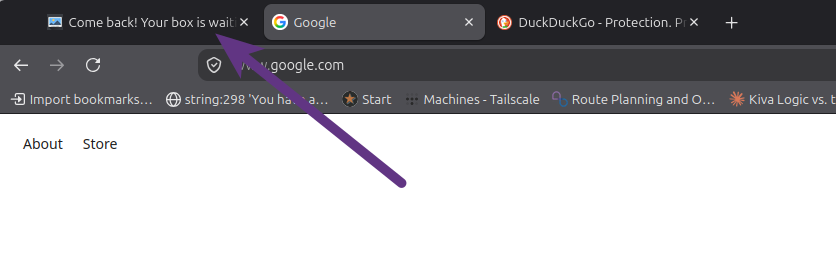
Tab Attention Catcher: Win Back Visitors Who Wander Off
Ever watch someone start signing up and then wander off to another tab? Most of them never come back. Your store now has a quiet little hook to pull them back.
When a visitor who isn't signed in is mid-signup, checking out, or has something in their cart and they switch to another browser tab, the browser-tab title changes to a short "come back" nudge, like "Come back! Your box is waiting..." The second they click back to your tab, the real title snaps right back. It only fires for people who've actually started something, so a first-timer just skimming your homepage never sees it, and your signed-in customers never see it either.
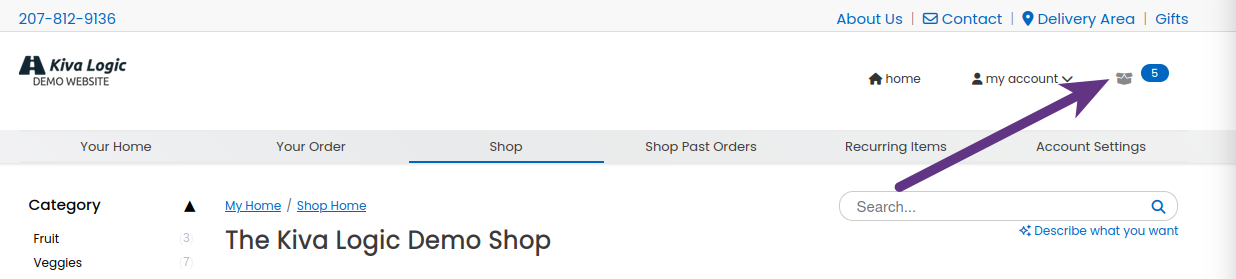
A modern slide-out cart for your store
Your store can now show a modern slide-out cart. When a shopper taps the cart icon, the cart slides in from the right on desktop, or up from the bottom on a phone, right over the page they're already on. No bouncing them off to a separate cart page and losing their spot.
Everything happens right there in the panel. They bump quantities up and down with the little plus and minus buttons and the total updates on the spot, no page reload. Each item also gets a one-tap button to make it recurring, so a shopper can add something to every order without digging through their settings, and a small menu lets them pick every 2, 3, or 4 orders instead. There's also a quick "group by category" view so a big cart stays easy to scan.

Ask 'How Did You Hear About Us?' After Signup, Not At Checkout
Asking "how did you hear about us?" at checkout does two things you don't want: it drops one more field between a shopper and their first order, and the people who bother to answer are often the ones who never buy. So now you can move that question off checkout entirely and ask it right after someone signs up, in a small popup on their account page, when they're a real paying customer and the reason they joined is still fresh.
Everything lives on one page now, under Settings → How Did You Hear?. You pick when to ask (at checkout like always, after signup instead, or both), manage the answer options, and set up follow-up questions, all in the same place.

Never lose a sold-out sale: back-in-stock alerts
When a product sells out, most shoppers just leave and don't come back. Now your store can catch them instead. Any sold-out product page shows a Email me when this is back in stock box, so the person who wanted it gets on a list instead of walking away.
It works for anyone, signed in or not. Logged-in customers get their email filled in already, guests just type theirs. If they come back to the page later, they see they're already on the list, with a Cancel link in case they change their mind.
Kiva Logic #17882: [URGENT] Network Outage
Hey Folks,
We're currently experiencing a widespread networking outage. We are in contact with our upstream providers, and will update you as we get more information.
Cheers,
Wayne Pierson
Kiva Logic Support
https://kivalogic.com
support@kivalogic.com
1-207-812-9136
Twitter: @kivalogic