
Kiva Logic Blog
Updates, tips, and news from our team

New Route Optimizer Engine: Mapbox
The Route Optimizer from yesterday now has a second engine to choose from: Mapbox Optimization. Same job of sorting your stops into an efficient order, but for most stores it's free, one whole day of routing counts as a single request and the first 100,000 a month are free, so you're realistically looking at zero.
You pick the engine under Route Optimizer → Settings. OpenRouteService, the one you had yesterday, is still there and works fine. Mapbox just gives you more headroom without a bill, so it's a good one to start with. Setup is a one-time thing: a free Mapbox account, a quick form to switch on Optimization v2, then paste your access token. The full walkthrough is in the setup guide.
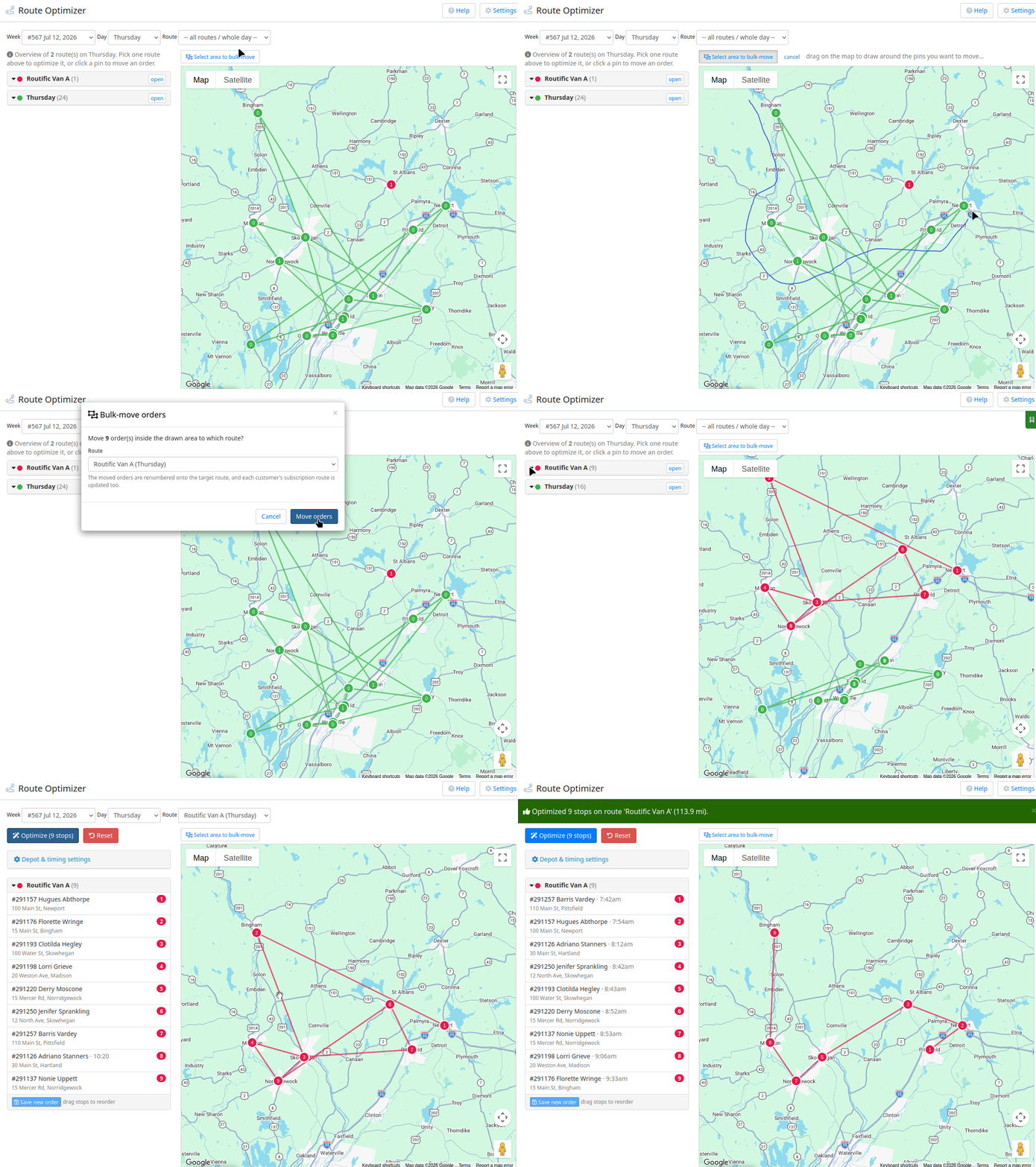
Free Route Optimization?!? YES*
Route optimization is one of those things that usually costs a fortune, or comes bundled into some pricey logistics add-on. Not here. Your store can now optimize delivery routes right inside the admin, for free.*
Head to Delivery → Route Optimizer, pick a week and a day, and the whole day shows up on a map with every route in its own color. Choose a single route, hit optimize, and it sequences the stops for you and drops the driving order right back onto the orders.
The part that's genuinely fun is that you can draw. Click Select area, lasso a group of pins on the map, and drop them all onto another route in one shot. You can also click any pin to change its route or stop number, or just drag stops around in the list to reorder them by hand.

Email Capture Conversions Report
Ever wonder how many of the people who hand over their email actually turn into paying customers? There's now a report that answers exactly that. You'll find it under Reports → Acquisition → Email Capture Conversions, with a shortcut button on the Drip Emails page too.
It takes everyone who has given you their email (popup signups, newsletter, imported lead lists) and shows how many went on to become customers, along with your conversion rate. Filter by date range or by a specific campaign to see which of your lists actually pull people in.
It's careful about the numbers too. People who signed up and later became customers (the real conversions) are counted separately from folks who were already customers when they got added to a list, so your rate reflects genuine new business.

Social Proof Popups
You've seen those little popups on big online stores, "someone in Reno just signed up," "someone in Austin just grabbed the veggie box." They work because people trust other people who are already buying. Now your store can do the same.
Flip it on and a small notification slides up in the corner of your storefront showing real recent activity from your own customers: someone signing up for a box, adding an item, upgrading their box size, swapping out a product they didn't want. It only ever shows the good stuff, never a cancel or a skip, and only a first name and city, never a last name, email, or address.
You control the whole look. Pick a style (a clean avatar card, a product-image card, or a small minimal pill), choose which corner it sits in, set how often it pops, and use the live preview right on the settings page to see exactly what your visitors see before anything goes live.

Two ways to view a customer's payment info
Every customer's Payment Info window now comes in two flavors, and you can switch between them whenever you want.
The newer one is a full payment-method manager. It lists every card or bank account on file, lets you add more than one, mark which is the default for billing, and delete the ones you don't need. Handy if a customer keeps a couple of cards around or you're juggling which one actually gets charged.
The classic one is the simpler single-method view a lot of you were used to: the Profile ID, Payment Profile ID, and payment type fields, right there in one shot. Nothing wrong with it, and some of you just prefer it, so it's not going anywhere.

Dollar discounts that only come off Marketplace
You can now build a dollar-amount discount that only comes off Marketplace items, not the box. Set up a code for something like $10 off, pick Apply only to add-ons under Conditions, and the discount only touches their grocery add-ons. If they've got $6 of Marketplace in the cart they get $6 off, if they've loaded up $40 worth they get the full $10, and it never spills onto the box price.
Before this, a flat dollar code just dropped a credit on the whole order, so there was no clean way to say "here's $10 toward Marketplace." Now there is, and it works the same way the percentage-off-add-ons codes always have. It's figured per order against their real add-on total, and the customer sees "up to $10 off add-ons" at checkout and on their account, so nobody's confused when the number lands smaller than the sticker.
You'll find it on the Add Discount Code page under Discounts, same spot you already make codes. And you can still attach a free product to the same code, so "$10 off Marketplace plus a free dozen eggs on the first order" is one code now.

Turn Facebook and Instagram Leads Into Signups
Most of the traffic hitting your sign-up page comes straight out of the Facebook and Instagram apps, and that little in-app browser fights you the whole way. So instead of dragging those people out to a full sign-up page, we can meet them right where they already are.
Facebook and Instagram have a native lead form (Meta calls them Instant Forms) that opens right inside the app, no browser jump. It fills in the person's name, email, phone, and zip straight from their profile, so they sign up with basically zero typing, just a couple taps. The second they submit, that lead lands in your store automatically. We check whether their zip is in your delivery area, then email them a link that's already filled in with their info, so all they have to do is pick a box and add payment. Out-of-area folks still get saved and get a friendly "not there yet" note instead of disappearing.
Every lead shows up on the new Meta Lead Ads page under Reports, so you can see who came in, whether they were in your area, whether we emailed them, and who actually finished signing up.

Super Fresh Deadlines: Set an Order Cutoff for Any Vendor
You can now set an order cutoff for any vendor. If you work with a baker, a farm, or anyone who makes things fresh to order or has limited capacity, you've probably got a weekly deadline to get their orders in. The store will enforce it for you now.
Head to Settings → Vendors & Farms, edit a vendor, flip the cutoff on, and pick a day and time (say Sunday at 9pm).
From then on, once that moment passes, customers can no longer add that vendor's products to any order shipping that delivery week. No more sneaking a sourdough into an order after the baker has already started their run.
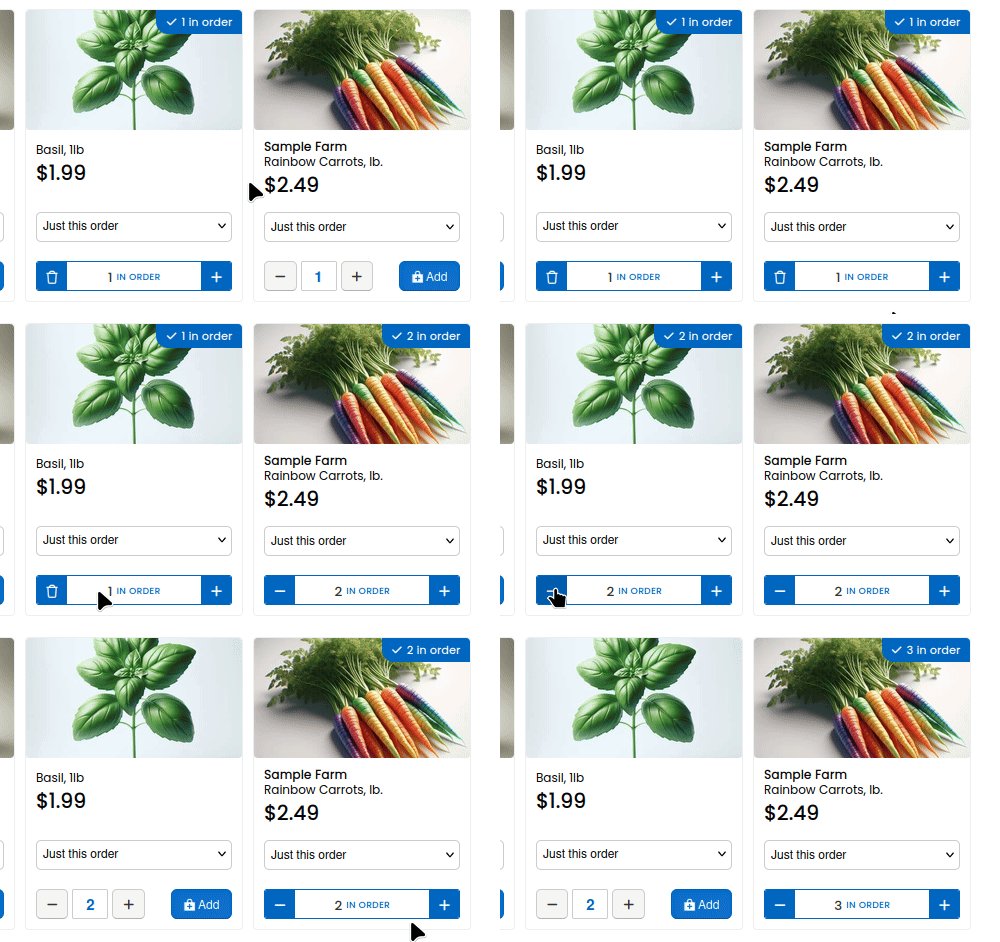
Faster shop buttons: live quantity steppers
Your shop just got a nice little upgrade, and there's nothing you need to do to turn it on. It's already live.
When a customer is browsing the shop and an item is already in their order for the week, they now see a live quantity stepper right on the product instead of having to re-add it. Tap plus, tap minus, and the change saves instantly. No re-clicking "Add," no page reloads, no hunting for the item in their cart to bump the count.
It's the same fast, tap-to-adjust feel people are used to from apps like DoorDash, and it does a few things for you:

Add to a Customer's Next Order
Just added a little tool that's going to make customer service a lot faster. You can now drop a product straight onto a customer's next order, right from their customer page. No more waiting for the order to build so you can go add something to it.
Open any customer, and in their Orders panel you'll see a little cart button. Click it and you get this. Pick a product, set the quantity, choose how it should go on, and hit Add. It sits in a "next order" queue and gets applied automatically the moment their next order is built.
The "how it goes on" part is the fun bit. You've got four options: