
How to Spot Fake AI Emails - a Warning for the AI Age
Good morning!
This email is not so much related to the Kiva Logic software as it is a general 'heads up' that I just want to share with you, just something for you and your employees to keep an eye out for.
With all these new AI design tools, email spamming and phishing is even scarier.
The designs of these 'fake' emails that might look like your bank, your social media, the post office, anything really- they are tremendously good.
Criminals can use the same tools that you or I use to come up with designs and email templates to make an email look exactly like an official email. It's scary.
Look at this email I received for example- at first glance, it looks just like the normal USPS emails that I am used to seeing! Scanning it quickly- this email looks legit!
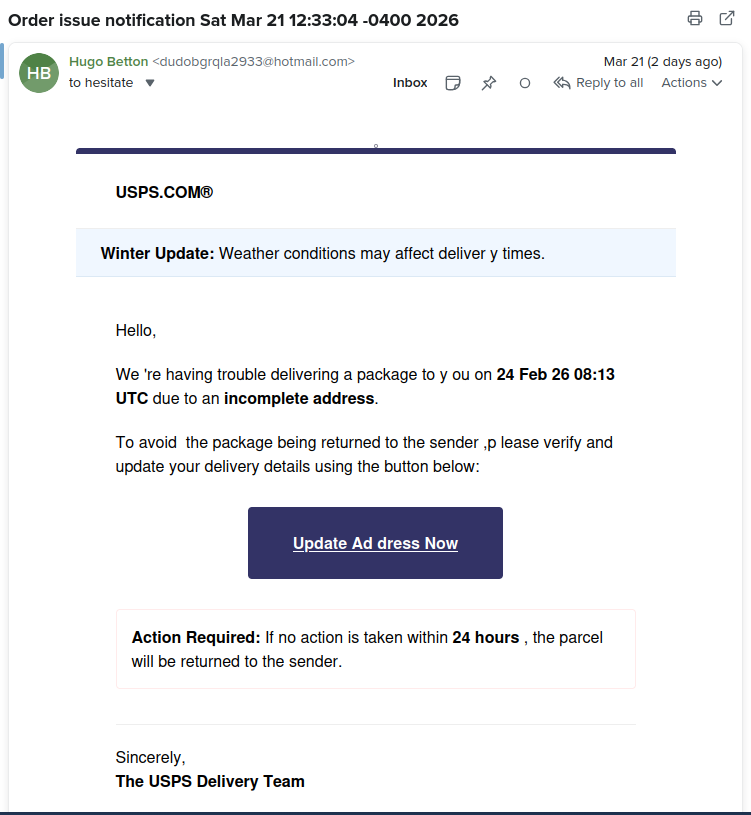
How can we tell it's fake?
- the sender address is some random name
- the sender email is NOT an official USPS domain
- still a few spelling errors
- I am NOT expecting any packages
- If I hover my mouse over any links or buttons, they go to a mysterious domain that is NOT the usps.gov
My first check is always the email address, then I check the links.
If I have any doubt at all, don't click anything, go directly to the website in question, and log in like normal to look for any messages.
Ok, that's my public service announcement for the day- I hope everyone had a nice weekend.
Wayne