
Kiva Logic Blog
Updates, tips, and news from our team
Kiva Logic- OpenAi Business Profile feature
Hey folks!
Another email from Kiva Logic this week? Too much! I know, it's getting a little overboard. Anyways... sorry about that, but this seems kind of like a cool news thing to pay attention to.
OpenAI just released a 'claim your business profile' feature two days ago. I recommend claiming yours if you can.
Claim your store's profile in ChatGPT
On November 10, OpenAI launched Businesses in ChatGPT, a way for companies to claim the profile ChatGPT shows when someone asks about them. It is brand new, it is in beta, and nobody knows yet how big it gets. That is exactly why it is worth claiming now. Early is cheap. Late is a scramble.
Here is what it does. You claim the listing ChatGPT already shows for your business, prove you own it, and get a verified checkmark on your profile. From there you keep your details accurate, so when a shopper asks ChatGPT about your store, it answers with the real thing instead of a guess.
To claim it, OpenAI asks you to prove you own your domain by adding a DNS record. That part is usually the headache: log into your domain host, hunt down the DNS settings, paste a record in exactly the right spot. We took that off your plate.

Ask a sharper "why" when customers skip
When someone skips a delivery, that's your best shot at learning why, and now your skip page can ask a real follow-up instead of just logging a reason.
Each skip reason can carry its own question. On a reason like "Too expensive this week" you can ask What price would feel fair to you?, and on "Going on vacation" you can skip the question entirely. You set it per reason under Settings → Skip Reasons, in the new Other text prompt field. Leave it blank and the box just says "Please tell us more."
For the customer it's one clean step. The reasons show up as buttons, and the second they pick one the others fade away so there's just the one thing in front of them: their answer, and a box to say more. A back link lets them switch if they tapped the wrong one.
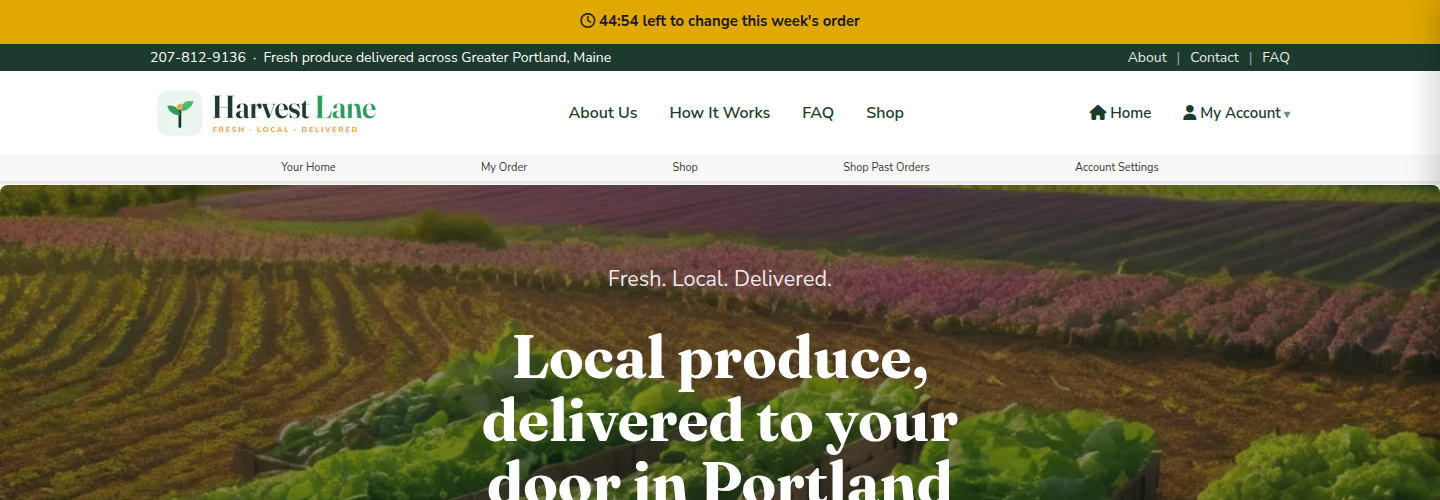
A live cutoff countdown so customers finish in time
Customers who get on at the last minute and find the ordering window already closed are a quiet source of missed revenue and support tickets. The new Cutoff Countdown Bar fixes that. When a shopper is near their route cutoff, a live countdown appears at the top of your store so they know exactly how long they have left to finish.
It reads the situation and shows the right message. It counts down live and turns red in the final few minutes. On desktop it sits right below your logged-in bar; on a phone it sits at the top of the screen. Here is each version on a live store.
For a customer with an open order this week, the bar shows how long they have to make changes before cutoff.
Get Ready for the Holidays: Corporate Gift Feature & Reminders
Good morning and happy Tuesday!
Holidays are coming real quick, so I want to drop some new things/reminders for you.
New Things:
The biggest is our "Corporate Gift Buying Feature". You can advertise, promote, and support large gift box givers this holiday season- they can specify how many boxes they want to buy, check out online, and they get their own portal for how they want to distribute those boxes via links or invites. We even have extra things businesses usually like or need like a PDF receipt for them to download, tracking of who has accepted, and the ability to block or uninvite someone as well (nefarious?!)

Catch menu mistakes before orders go out
Every week you build your menu and hit Create Orders. If a box came out empty, a quantity landed in the wrong column, or an item is missing its case cost, you usually don't find out until the orders are already made. A store owner put it plainly: they didn't want more features, they wanted to be told when something's off before it goes out.
So now the Menu Builder checks your week before it builds. Click Create Orders and it compares this week's boxes to your own recent weeks first, and if something looks off it stops and shows you instead of generating.
It catches the common ones: a box that came out empty or way lighter than usual, a box cost way off from normal, a sub item missing its case cost or quantity, or a price set way outside your usual range. The important part is that it only ever compares against how your own store normally looks, not some generic rule about what a box should have. If you always do something a certain way, that's your normal and it stays quiet. It only speaks up when this week is genuinely different from your own pattern.

Show your driver in the delivery email
You can now put your driver's photo, name, and a short bio right in your delivery-day email. Instead of a box just showing up, your customer sees a friendly face and knows exactly who is coming.
There are three new tags you can drop into any email template, so you can show as much or as little as you like:
driver_card gives you the full card above, photo, name, and bio. driver_card_nobio is the same card without the bio, for when you would rather keep it short or your drivers do not have bios written yet. And driver_name is just the name, so you can work it into a sentence like "Your driver today is Hiro."
A Federal Loan Guarantee for Food Businesses: the SBA Grocery Guarantee
If you run a local grocery, a food hub, a farm operation, or a delivery business, there is a federal financing option worth knowing about. In 2026 the U.S. Small Business Administration launched the 90% Grocery Guarantee, which makes it easier and cheaper for food businesses to borrow by guaranteeing a larger share of the loan for the lender.
The Grocery Guarantee is not a new, separate loan. It is an expansion of the SBA's existing International Trade Loan program. Under it, the SBA backs 90% of an eligible loan, up from the 75% guarantee on a standard SBA 7(a) loan. A bigger guarantee lowers the lender's risk, so food businesses tend to get approved more easily and on better terms.
The program covers small businesses across the food supply chain, including:
Many local delivery and farm-to-door businesses fall squarely inside these categories.

Gift Boxes to a Whole Team
Corporate gifting is one of the biggest openings your store has this holiday season, and almost no local food business goes after it. Companies spend real money every December sending gifts to their teams and their clients, and most of it goes to generic gift baskets shipped from a warehouse three states away. You have something those baskets cannot touch: fresh, local produce from a business right in their own community. Now your store can sell exactly that, a whole batch of boxes gifted to a company's entire team in one payment.
Think about the math for a second. One company gifting your boxes to forty employees is forty new households tasting your produce, and a single sale that dwarfs a normal order. If even a handful of those people keep going after the gift ends, you have turned one December phone call into a stack of year-round subscribers. This is the kind of thing worth getting in front of local businesses directly: call the person planning the office holiday gifts, pitch the HR team, pitch the company that wants to thank its clients with something local and real instead of another popcorn tin.
It is also a story local news loves this time of year. A local company feeding its whole team with boxes from a local farm for the holidays is exactly the feel-good segment a morning show or community paper will run. Pitch it. "Local business supports local farm to feed employees for the holidays" writes itself, and it puts your store in front of your whole area for free.
Here is how it works. A company picks a box, pays once for as many as they want, and gets a single link to share. No card from the recipients, and no spreadsheet of addresses for the company to collect.

A fairer cookie banner, and one that respects a no
Your store now gives shoppers an equal, honest choice. And a reject that actually switches the tracking off.
For years the typical cookie banner showed one friendly "Allow" button and tucked the way to decline somewhere quieter. That is no longer just a little rude. It has become a legal problem.
In 2025 the California Privacy Protection Agency fined Honda $632,500, in part for a consent banner that made accepting far easier than rejecting. A one sided banner is now a named enforcement target, not a theoretical risk. Source: California Privacy Protection Agency enforcement action, 2025.
So we rebuilt the banner your store shows. "Reject all" and "Allow all" are now matching buttons, side by side, with neither one dressed up to win.

Gross Margin, boxes and add-ons in one place
Your store can now see its gross margin on boxes and add-ons together, in one place, under Reports → Finance → Gross Margin. No more exporting to a spreadsheet or waiting on QuickBooks to catch up.
It breaks down two ways: per box type, and as a weekly total you can run across any range of weeks. The interesting part is the two margin numbers sitting side by side. Ideal margin is what you'd make if you bought exactly what went into the boxes. Real margin is what you actually make once you buy by the case, since you can't buy half a case of anything. The difference between them is your purchasing overage, the real cost of rounding up to whole cases every week.
Every number is valued at the cost that was live that delivery week, so looking back at older weeks stays accurate even after you've changed a price since. The weeks don't drift on you.