Kiva Logic- New Communication Settings for customers (replacing email unsubscribe)
Good morning!
SHORT VERSION: emails now classified into categories, customers can unsubscribe from individual categories, vital emails are always sent
Longer version....
Inspired by one of Kiva Logic's customers (thank you J&M for the spark), email unsubscribing and blacklisting have been completely torn down and re-built. Let's see if I can do bullet points for you:
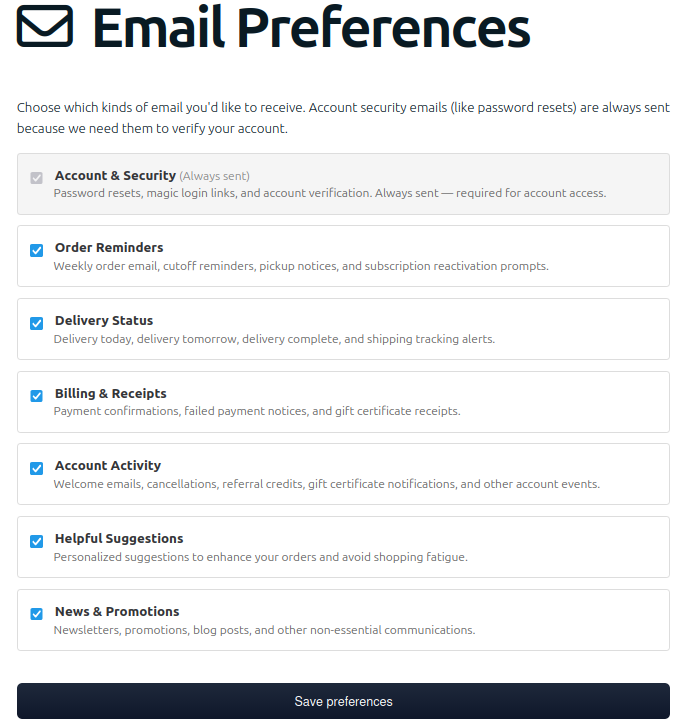
- Emails now fit in to one of 7 categories (billing, delivery, account, etc)
- Customers can subscribe or unsubscribe from those categories (except the vital one)
- No more is there just one setting "subscribed" or "unsubscribed"
- When a customer clicks 'unsubscribe' in an email, they now have the option to select what categories to unsubscribe from
- Vital emails like password reset, can no longer be unsubscribed from (categories 'Account & Security')
- All blacklist handling has been moved in-house from our email transport service
- Marketing emails now include 'one-click' unsubscribe headers that allow those 'unsubscribe' buttons in email clients to work!
NOTE: 'Order Reminders' has an option to be set as 'always sent' or not, so if you want it one way or the other let us know.
You'll see the new 'communication settings' page when logged in as a customer and on the admin side you'll see the categories a customer is subscribed to in their 'Email' section on the customer account details page.
There is always a tremendous concern over getting blacklisted by one or more of the big email providers like Microsoft or Gmail, so this seems to be a solid platform to try to ensure the 'vital' emails get through as much as possible, while still respecting customer wishes when it comes to non-essential emails- helping to reduce the risk of being marked a spam sender and hurting your businesses 'sender score'.
When you send emails, please mark them correctly- there are NO WINNERS if you send out a bulk email and label it as 'account & security'! This will hurt you more than help. I don't think any of our customers will abuse this power, but I did just want to give a warning- please mark them correctly. If it's a marketing email you are sending out to try to get people to buy last minute Apples, label it as 'News & Promotions'.
Have a great Thursday,
Wayne
email was written by human, read more on the blog post which was written mostly by ai
Here's a screenshot of the customer account email preferences page now: