
Holiday Weeks page just got smarter (and the bugs are fixed)
Quick heads up about an under-the-radar admin page that just got friendlier, in case you didn't even know it existed.
Holiday Weeks (under Settings → Holiday Weeks) is where you tell the system which weeks you won't be delivering. Christmas week, Thanksgiving, July 4th, the random week you close every August for the state fair, whatever. Once a week is marked, the system skips order creation for that week, the calendar shows it as closed, and customers don't get charged or confused.
The page has been around for years but it was easy to forget about... and the date picker had some quirks that made adding a new week kind of annoying. Both of those got fixed this week.
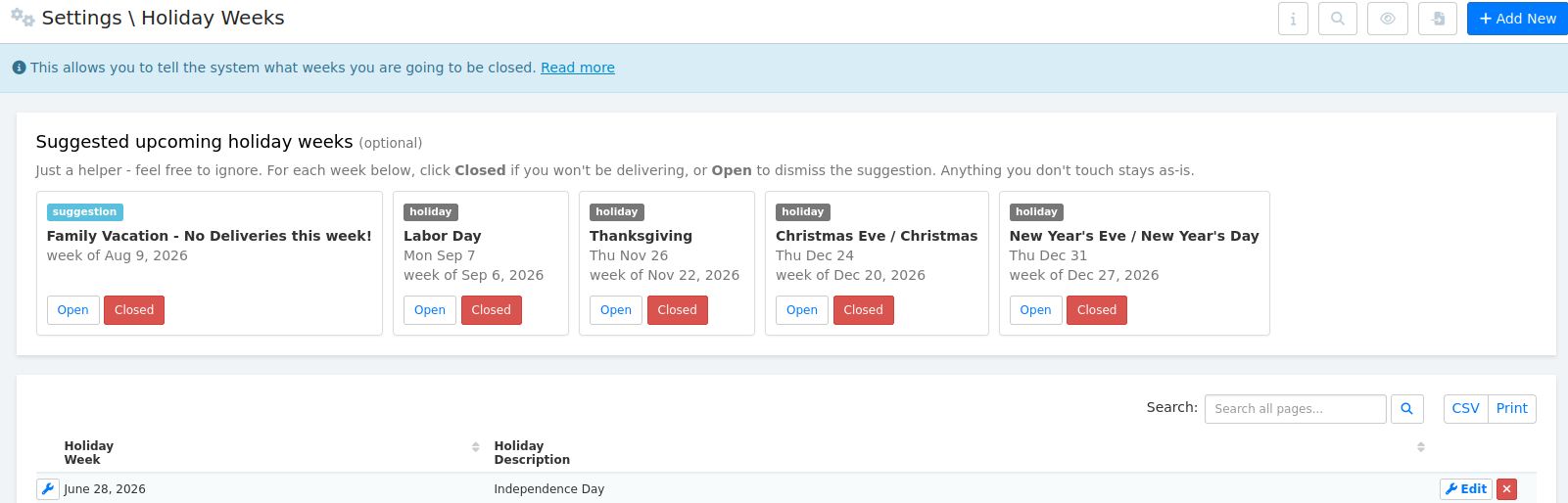
Now when you open the page, you'll see a row of suggestion cards at the top with the next 5 upcoming holidays already laid out. Each one has two buttons: Closed if you won't be delivering that week (adds the row for you in one click), or Open if you'll be running normally (dismisses the suggestion so it won't ask again). Anything you don't touch just stays as-is. It's totally optional, just there to save you a few clicks.
The suggestions come from two places:
- Standard US and Canada holidays (Memorial Day, Labor Day, Canada Day, Thanksgiving, Christmas, etc.) shown with a gray holiday badge
- Patterns it picks up from your own history... if you've closed for the same week in 2+ different years, it figures that's probably an annual thing and suggests it again. Shows up with a blue suggestion badge and uses whatever description you wrote last time
So if you've taken the second week of August off for the past few years for vacation or a local event, that'll just appear in the row without you having to remember. Pretty handy.
The Add New form on this page also got a few fixes... it used to default the date to 2014 (lol, the literal sample row from like a decade ago) and there was a bug where the year-only would save if you typed instead of using the picker. Both fixed now, it defaults to next week and saves properly.
If you don't have any holiday weeks set yet and you know you're going to close some weeks this year, this is a good time to pop over and knock a few out. Takes about 10 seconds.
Let me know if anything looks weird!